



The Home Services Marketing Stack: How to Connect LSA, Your Booking Page and ServiceTitan to Real Job Revenue
Key takeaways
- Leads and calls are the wrong scoreboard. Measure cost per booked job, invoiced revenue by channel and membership attach rate.
- As LSA bidding moves inside Performance Max, Google optimizes on whatever job data you send it, so upload invoiced revenue through Data Manager.
- Every channel needs its own tracking number or UTM, and that source has to survive into the job record in your field service CRM.
- Keep dispatch and reminder texts separate from promotional texts, and run one opt-out process that stops promos everywhere.
- Clean attribution helps you compete with PE-backed roll-ups and supports what a buyer will pay for your business.
Home services marketing attribution ties each booked job, invoiced ticket and membership sold back to the channel that produced it. Track calls and forms with CallRail, store the source on the job in ServiceTitan, Housecall Pro or Jobber, then upload invoiced revenue to Google through Data Manager so LSA and Performance Max optimize toward paying jobs.
Measure booked jobs instead of leads
Your marketing report says it was a strong month. Calls are up, leads are up, and your agency is happy.
Then you look at revenue, and it didn't move the way the lead count did. Two things are usually behind that gap:
- The cheapest lead source on the report isn't the one filling the schedule with good jobs and memberships.
- LSA bidding now runs inside Performance Max, so Google optimizes on whatever job data you feed it. If all you feed it is leads, it finds you more cheap leads.
What you actually need to know is which channel produced the booked jobs, the invoiced revenue and the memberships, and what each one cost.
To get there, we carry the lead source from the first call all the way to the invoice in ServiceTitan, Housecall Pro or Jobber, then send that revenue back to Google. With full attribution, you can trace every booked job, every invoiced ticket and every membership to the channel and the dollar that produced it.
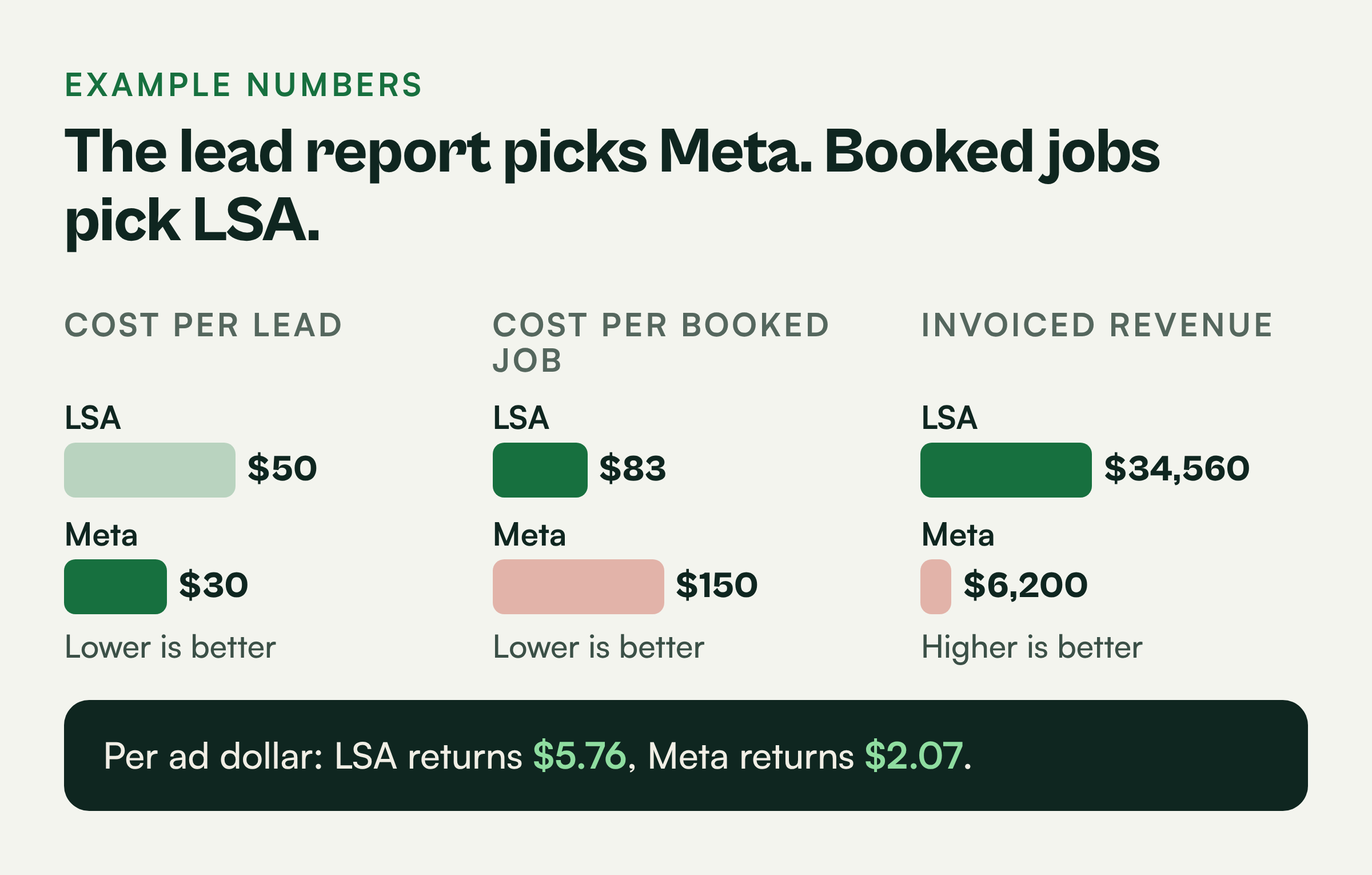
Here is why stopping at leads costs you. These are example numbers for illustration only.
- LSA: $6,000 spend, 120 leads, $50 per lead
- Meta: $3,000 spend, 100 leads, $30 per lead
On a lead report, Meta looks like the better deal. Now follow those same leads into ServiceTitan.
- LSA: 72 booked jobs, $480 average invoice, 18 memberships sold. Cost per booked job is $6,000 / 72 = $83. Invoiced revenue is 72 x $480 = $34,560.
- Meta: 20 booked jobs, $310 average invoice, 2 memberships sold. Cost per booked job is $3,000 / 20 = $150. Invoiced revenue is 20 x $310 = $6,200.
In this example, LSA returns $5.76 in invoiced revenue per ad dollar and Meta returns $2.07. The lead report pointed you in the wrong direction.
This is the system I build first. Over 15+ years and $500M+ in marketing spend managed, including a home service business that grew from 1 to 11 locations and is now franchising, booked-job attribution is what made every later budget decision easy.
Fix the loop from first click to invoice
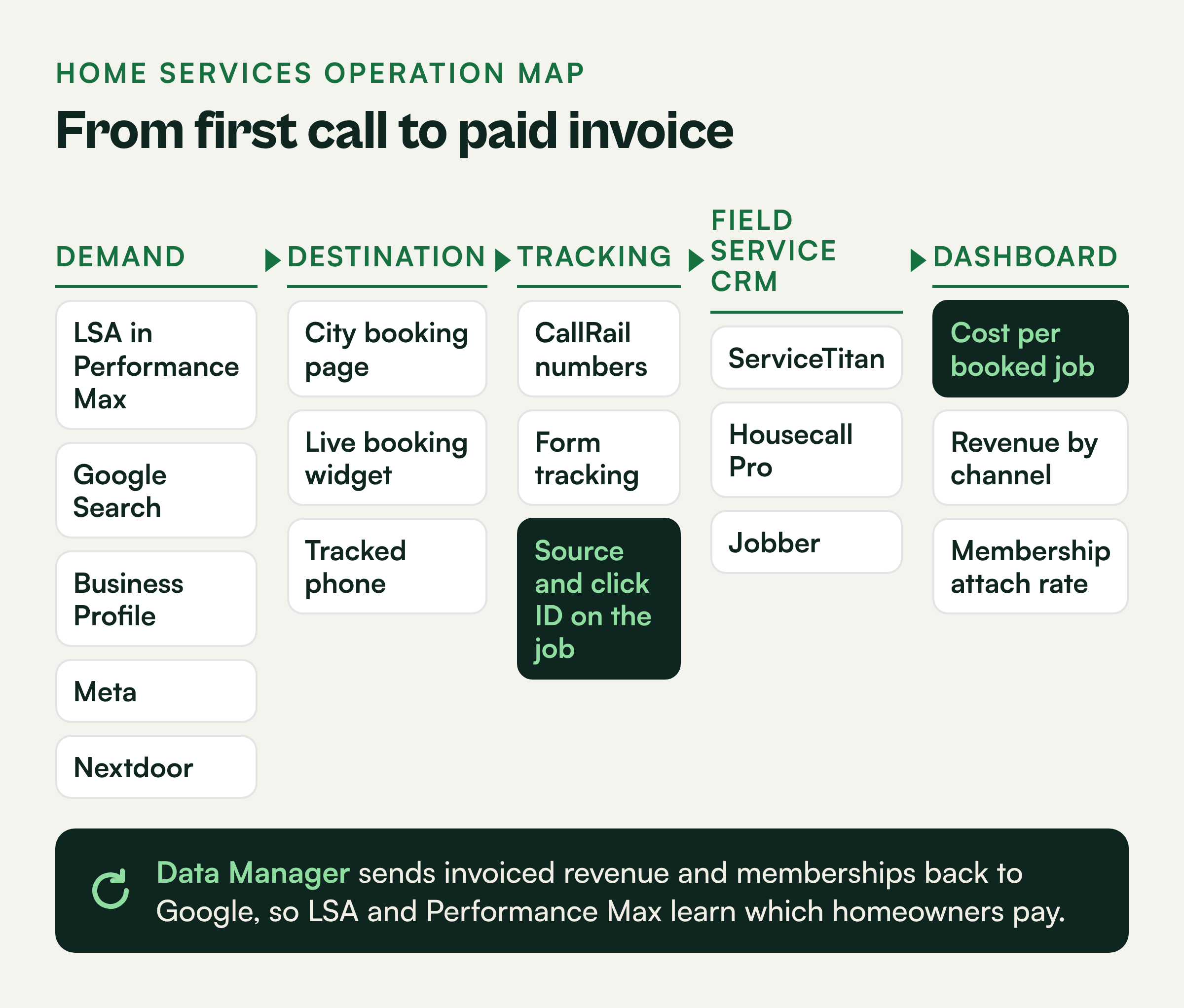
Calls and form fills come in from several places, and each one gets booked as a job in your field service CRM.
Two things around that setup have changed. Google is moving LSA bidding inside Performance Max, and the algorithm optimizes toward whatever conversion data you feed it. PE-backed roll-ups are outspending independent shops in most metros, and they run on this kind of data.
That puts the pressure on one link: connecting the first click to the final invoice, so Google and a future buyer both see what your marketing earned.
We close that link by building a connected stack. The source of every call and form gets captured, stored on the job in your field service CRM, and then sent back to Google with the invoiced revenue attached.
Send Google calls and it finds more callers. Send it invoiced jobs and memberships and it looks for more homeowners who pay.
When you go to sell, a buyer will ask for cost per booked job and revenue by channel. Clean numbers make that conversation shorter and support a stronger valuation.
Your first step takes about an hour. Export the last 90 days of completed jobs from your CRM and check what share have a specific marketing source attached.
If more than 20% say Other, Google or nothing at all, start there. This is the first diagnostic in every HVAC marketing engagement.
Run five demand channels and tag each one
Leads come in from Google, Facebook, neighbors and your profile listing, and you keep hearing about new channels to try.
The trouble starts when two channels share a phone number or a source. Once that happens, you can't tell which one earned the job, and you can't compare them on booked jobs.
We run five channels and give each one its own tracking number or its own UTM. Five channels tracked separately will tell you more than ten that blur together.
LSA inside Performance Max. This is usually your highest intent, pay per lead channel with the Google Guaranteed badge. Answer every lead fast and dispute the ones that were spam or out of area.
Google Search. Bid on the terms homeowners type when the system is down or they are pricing a replacement, such as AC repair near me or furnace replacement cost. Give Search its own tracking number and UTM tags.
Google Business Profile. Keep one profile per real location. Add a UTM to the website link, for example utm_source=google&utm_medium=organic&utm_campaign=gbp, so profile traffic stops hiding inside organic.
Meta. Use it for seasonal tune-up offers, membership offers and retargeting people who visited your booking page. Send that traffic to the booking page, not your home page.
Nextdoor. Homeowners ask neighbors who they trust. A maintained business page plus local ads in your strongest neighborhoods can produce well qualified jobs.
Build landing pages that book the job
Your ad accounts show plenty of paid clicks, and most of them land on your home page.
That is where a lot of them get lost. A generic home page makes the homeowner hunt, and many of them leave. Google AI Mode and other AI answers pull from what they can read on the page, so a price trapped inside an image is invisible to them.
We send every paid click to a page built to book an appointment, with one page per service area or city you actually cover. Each page should include:
- A headline with the service and city, such as AC Repair in Plano
- A real price in plain text, such as a diagnostic visit price, with a Book Now button above the fold
- Your hours and whether you offer same day or after hours service
- A live booking widget showing open time slots from your CRM
- Recent reviews from customers in that area
- Your membership offer with the price and what it includes
- A list of neighborhoods and ZIP codes you serve
- A tracked phone number for people who would rather call
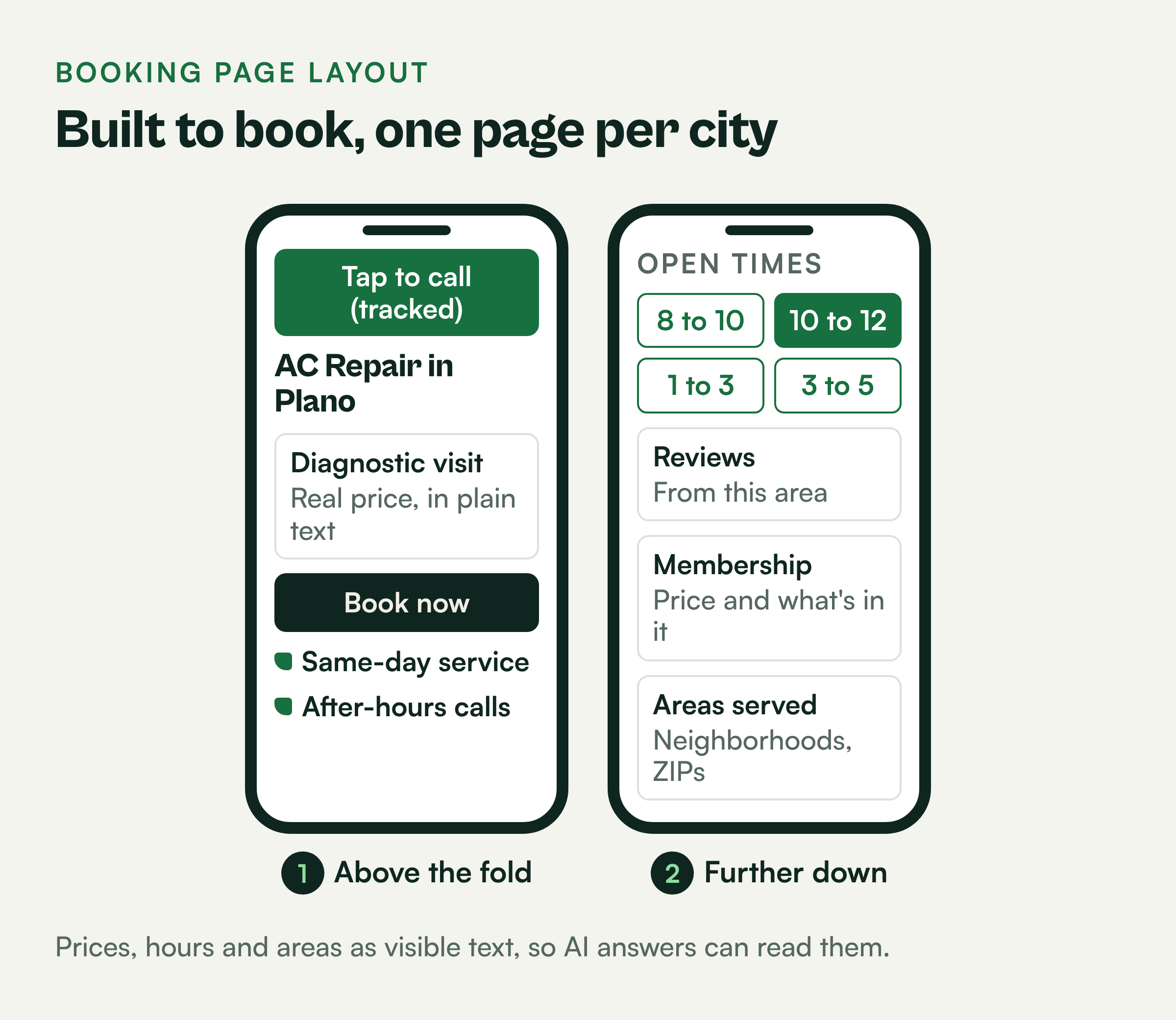
Write prices, hours and service areas as visible text and back them up with LocalBusiness structured data.
The booking widget does double duty. It converts the homeowner who does not want to call, and it creates a job record with the source already attached.
Set up CallRail so the source reaches the job record
Most of your HVAC jobs start with a phone call, the same as always. By the time the CSR books the job, nobody knows which ad, listing or truck wrap made the phone ring.
LSA adds a second gap. Those leads come through Google's own lead record and forwarding number, so they don't look like your other calls.
The source of every call and form needs to be on the job record before the CSR books it, which is why we make call tracking the foundation. CallRail is a common choice because it handles calls and forms in one place.
- Use dynamic number insertion on your website so each visitor sees a number tied to how they arrived.
- Use static tracking numbers on GBP, Nextdoor and anything offline like truck wraps and mailers.
- Match LSA leads into your CRM by the caller's phone number.
- Turn on CallRail form tracking so web forms capture the UTM values and the Google click ID.
- Connect CallRail to your CRM through a native integration if one exists, or through a tool like Zapier if it does not.
When your CSR books the job, the source, the click ID and the customer's phone and email should already be sitting on the record. Train CSRs to never overwrite that source with a guess.
Pick the CRM that sends revenue back to Google
You've seen the demos from ServiceTitan, Housecall Pro and Jobber, and all three can run your scheduling, dispatch and invoicing.
Those demos focus on dispatch boards and invoices. None of them show how invoiced revenue gets back to Google, and that is the one question we judge them on.
ServiceTitan tends to fit multi-location shops with heavy membership programs and dedicated CSRs. Housecall Pro and Jobber tend to fit smaller teams that want something faster to set up and cheaper to run.
Before you sign, ask the sales rep to show you four things on a live screen:
- Where the marketing source and click ID are stored on a job
- How invoiced revenue and membership sales are tied to that job
- How that data gets to Google Ads Data Manager, either directly or as a scheduled file
- What happens when an invoice is changed or refunded after upload
Data Manager is the piece that closes the loop. It matches your customer data to Google's records and tells Performance Max which clicks became paid jobs.
If a vendor cannot show you that flow end to end, assume you will be building it yourself with exports and spreadsheets.
Which platforms send jobs and revenue to Google Ads directly
ServiceTitan, GoHighLevel and CallRail have their own Google Ads connections. Housecall Pro and Jobber send offline conversions through a bridge such as Zapier. Any of them can also feed a scheduled file into Data Manager, which connects directly to Google Sheets, SFTP, Salesforce and HubSpot.
| Platform | Direct Google Ads connection? | How it sends conversions | What breaks it |
|---|---|---|---|
| ServiceTitan | Yes, with Marketing Pro Ads Optimizer | When a job is marked complete, Revenue Import sends the job revenue to Google Ads matched on the GCLID, under a conversion action it creates called ServiceTitan Completed Jobs Conversion Action. | Jobs booked without a click ID. A package without Ads Optimizer. Call extension calls are left out on purpose, since Google already counts them. |
| GoHighLevel (GHL) | Yes, its own integration | The Add to Google Ads workflow action sends a conversion when a workflow trigger fires, such as a booked appointment, matched on the GCLID, GBRAID or WBRAID on the contact. You set the value. | A contact with no click ID. A conversion name that does not match Google Ads exactly, including capitalization and spacing. Both show as Skipped in the workflow's Execution Logs. |
| Housecall Pro | No native Google Ads conversion connection we could find | Zapier templates send scheduled or completed jobs to Google Ads as offline conversions. Its built-in Google connection brings Local Services Ads and Reserve with Google bookings into the Job Inbox. | Jobs with no stored click ID. A zap that fires on scheduled jobs when you meant completed and paid ones. |
| Jobber | No native Google Ads conversion connection we could find | Jobber sends request and booking events to GA4 on select plans. Offline conversions run through Zapier on closed jobs, approved quotes or new invoices. | No click ID on the client record. Jobber community users report that embedded request forms do not pass events to the page around them. |
| CallRail | Yes, its own integration | Posts calls and forms as conversions using Google click IDs, through CallRail's Google Ads integration. Needs its script, visitor tracking and auto-tagging. | No backfill for calls from before it was turned on. Renaming the conversion action stops posting. |
At a multi-location flooring company, 129 customers with $439K in installed jobs showed $0 deal value in the CRM, because the field service software and GoHighLevel were not connected. GoHighLevel's Google Ads action sends the value the workflow gives it, so a $0 deal sends $0. Connect the field service software to the CRM first, then turn on the upload.
Separate service texts from promo texts
Texting books more jobs and cuts down on no-shows.
It also brings two problems. Mixing service and promotional messages carries TCPA risk. Customers can revoke consent in more than one way, and each tool that sends texts has its own settings.
You can keep texting without mixing message types or missing an opt-out. We split your texts into two streams and run one opt-out process. Treat this section as a starting point and have your attorney review your setup.
Dispatch texts like your tech is on the way, appointment reminders and invoice links are service messages tied to work the customer requested. Promotional texts like a spring tune-up special are marketing messages and generally require prior express written consent.
Send these two streams from separate registered campaigns and keep consent records for each. Your booking page and CSR script should ask for marketing consent as its own checkbox or question.
When a customer texts STOP or tells a CSR or tech to stop, record it on the customer record in your CRM and suppress promos across every tool that sends texts.
A single process that every employee follows protects you better than five tools with five different settings.
Build the dashboard you and a buyer both want
Your current dashboard is full of clicks, calls and leads.
It can't tell you whether a problem sits in marketing, in the call center or in the field. It also doesn't show what a buyer's diligence team will ask for.
We put three core numbers on the dashboard, broken out by channel. They are the same numbers that diligence team will ask for.
Cost per booked job. Ad spend divided by booked jobs. Using the example numbers above, LSA came in at $83 and Meta at $150.
Revenue by channel. Invoiced revenue tied to each source, using invoices instead of estimates. This is the number Performance Max should be learning from.
Membership attach rate. Memberships sold divided by completed jobs. As an example, 48 memberships on 400 completed jobs is a 12% attach rate.
Cost per booked job is where most owners stop reading, and on its own it can still point budget the wrong way. Take another example month: $7,000 on Google Ads and $5,000 on Meta. ServiceTitan shows Google drove 60 booked jobs and Meta drove 28.
| Source | Booked jobs | Cost per booked job | Sold revenue |
|---|---|---|---|
| Google Ads | 60 | $117 | $16,000 |
| Meta | 28 | $179 | $58,000 |
Google wins on cost per booked job. Then you look at what those jobs were. Google's 60 were mostly $89 tune-ups and repair calls, and Meta's 28 included four system replacements.
Per ad dollar, Google returned $2.29 in sold revenue ($16,000 / $7,000) and Meta returned $11.60 ($58,000 / $5,000). You only see that when the source stays on the job all the way to the invoice, which is why revenue by channel sits right next to cost per booked job on the dashboard.
Add booking rate, which is booked jobs divided by leads, and average ticket. Those two tell you whether a problem sits in marketing, in the call center or in the field.
Booking rate only means something once every call has an outcome. In that same Google and Meta example month, 300 calls came in. Of those, 90 were existing customers, wrong numbers or callers outside the service area. Leave them in the lead count and your CSRs look like they book 29% of calls, which hides how much better call handling is worth.
We tag every call with an outcome: booked, price shopper, existing customer, out of area or wrong number. In the example, that leaves 210 real leads, and 88 booked jobs is a 42% booking rate (88 / 210).
At that volume, each point of booking rate is worth about 2 booked jobs a month (1% of 210 is 2.1). Moving from 42% to 52% adds 21 booked jobs without another dollar of ad spend. To find those points, have a manager listen to 20 unbooked calls a week and check the tags.
Memberships deserve extra attention. They create recurring revenue and repeat visits, and recurring revenue is something buyers look at closely.
You can see how HVAC shops compare in our home services marketing report, and the Marketing Impact OS shows how this dashboard is built.
Run this checklist every Monday and Thursday
After setup, your tracking, uploads and listings all appear to be working fine.
Attribution breaks quietly, though, and a small problem can cost you a month of bad data before anyone notices. The flooring company in the field notes above is a good example: its estimate form stopped redirecting, and nothing in the ad accounts flagged it.
We keep the data clean with a 20 minute review twice a week, every Monday and Thursday.
- GBP edits. Check each profile for suggested edits to hours, categories, phone or website. Reject anything you did not make.
- Upload health. Confirm the last Data Manager upload succeeded, check the match rate and fix any errors the same day.
- Charged missed calls. Review LSA leads you paid for that went unanswered or were spam. Dispute the eligible ones and fix the coverage gap that caused the miss. Here is more on LSA missed calls.
- NAP consistency. Make sure your name, address and phone match across GBP, your site, Yelp, BBB and Angi.
- Source coverage. Check the share of new jobs with a real source attached. Coach any CSR who is logging Other.
You can read more about the approach or see the full system in the home services book.
If you want a second set of eyes on your current stack, start with a free marketing assessment. It will show you where the source is getting lost between the first call and the invoice.
Questions owners ask
What is home services marketing attribution?
It is the process of tying each booked job, its invoiced revenue and any membership sold back to the marketing channel that produced it. It goes past counting calls and leads so you can see which channels actually pay.
Why does LSA moving into Performance Max change how I track?
Performance Max optimizes toward the conversions you send it. If you only send calls, it finds more callers. If you upload invoiced revenue and memberships through Data Manager, it can learn which clicks turn into paying customers.
Which CRM is best for attribution: ServiceTitan, Housecall Pro or Jobber?
Pick the one that stores the marketing source and click ID on each job and gets invoiced revenue to Google Ads Data Manager cleanly. Ask each vendor to demo that flow end to end before you sign.
Can I put a CallRail number on my Local Services Ads?
LSA uses Google's own lead record and forwarding number. Use CallRail on your website, GBP and offline media, and match LSA leads into your CRM by the caller's phone number.
How does attribution affect what my business is worth?
Buyers, including PE-backed groups, want proof of cost per booked job, revenue by channel and recurring membership revenue. Clean, consistent data makes diligence easier and supports a stronger valuation.