


The HIPAA-Ready Patient Acquisition Stack: Channels, Booking Pages, Tracking and Attribution for Medical Practices
Key takeaways
- Measure the kept first appointment from a new patient. Form fills and clicks look good while revenue stays flat.
- Ad pixels on booking, form and condition pages can send patient information to Google and Meta. Audit and remove them first.
- Server-side tracking through a vendor that signs a BAA lets you keep attribution while stripping names, contact details and conditions.
- Send kept appointments back to Google Ads as offline conversions using only click IDs, conversion names and values.
- Put answer rate by hour next to ad spend, because missed new-patient calls often cost more than a weak campaign.
HIPAA compliant marketing tracking for medical practices means removing ad pixels from booking, form and condition pages. Route events through a server-side vendor that signs a BAA, and send only non-identifying click IDs and kept-appointment conversions back to Google Ads. Then judge every channel by cost per kept new patient, booked-to-kept rate and phone answer rate.
Fix the tracking problem before you add spend
New patient calls and online bookings are coming in, and every month your agency sends a report full of clicks and form fills.
Underneath that report, three problems are usually sitting at once:
- The Meta pixel and Google tags on your booking and condition pages can send patient information to ad platforms, which is real legal exposure.
- If you rip the tracking out to be safe, you have no idea which channel brings in patients who actually show up.
- Nobody on your team or your agency can tell you what one kept first appointment costs.
The work is getting full attribution without sending protected health information to Google or Meta. That means choosing every tool in the chain for that job: the landing page, the booking flow, server-side tracking from a vendor that signs a BAA, the phone system and the practice management system.
Once that chain is in place, every channel gets judged by cost per kept new patient. Clicks and form fills are steps along the way.
I'm the #1 lifetime-ranked fractional CMO on Upwork (Expert-Vetted), with 15+ years in growth and more than $500M in marketing spend managed, including scaling a healthcare practice to 16 locations. The setup below is what I put in place before I let a practice raise its budget.
Measure the number that pays the bills
Your monthly report shows a healthy cost per lead, with plenty of form fills, clicks and booking requests. Revenue stays flat anyway.
Those are the wrong numbers to run a practice on. The right one is a kept first appointment from a new patient, and form fills, clicks and booking requests are steps along the way.
Here is example math for a practice spending $20,000 a month on ads.
- Example: 500 form fills and calls reported by the ad platforms, so $40 per lead.
- Example: 300 of those become booked new-patient appointments, so about $67 per booking.
- Example: 195 of those patients show up, a 65% booked-to-kept rate, so about $103 per kept new patient.
The $40 number is the one most agencies put on the monthly report. The number you run the practice on is $103.
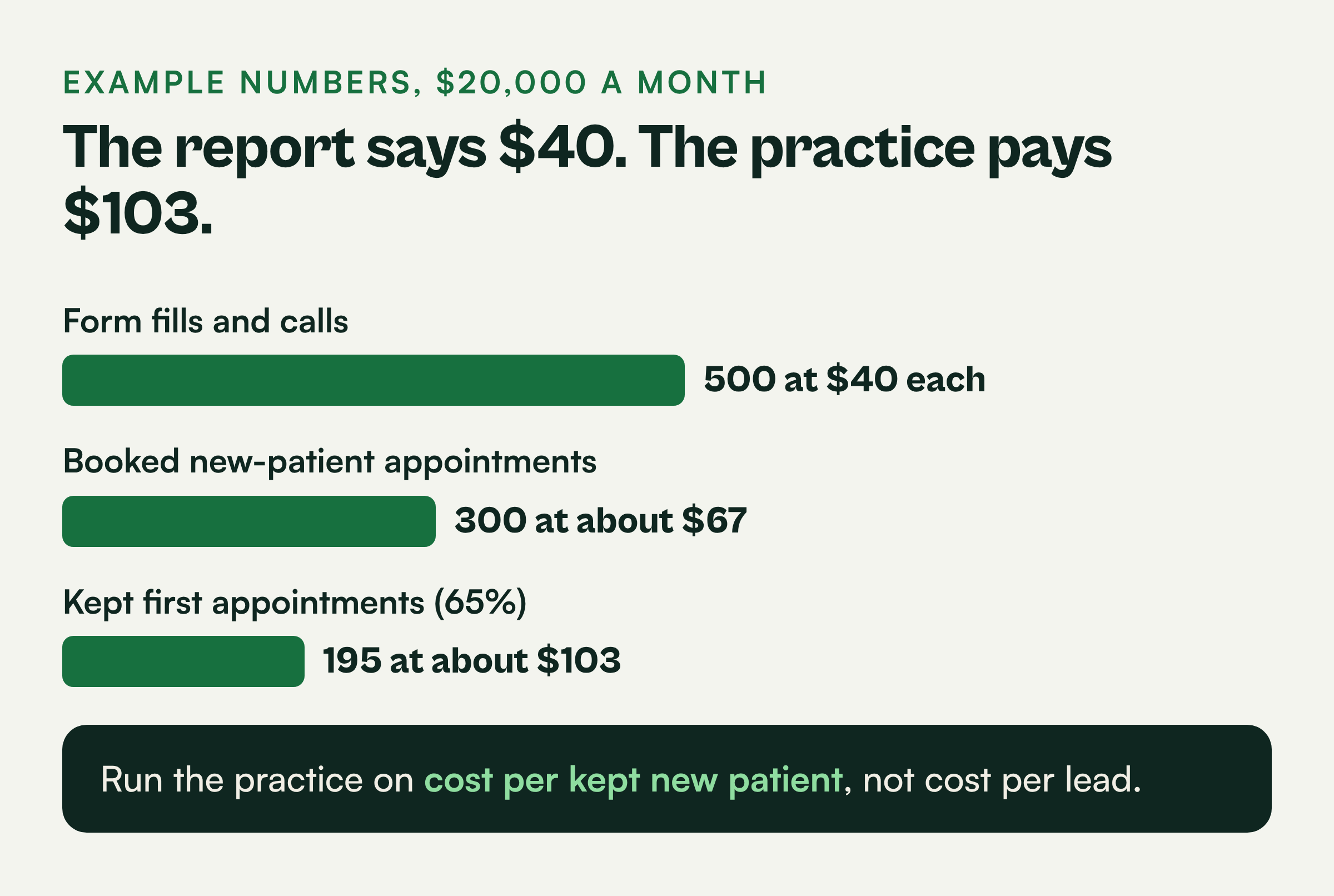
That $103 moves when your front desk, phones and reminders change. Ad platform reports will never show you that.
Start with one audit this week
By now it is clear your tracking and reporting need work, and the full fix looks big. It is a stack with six parts: demand channels, service and condition pages, online booking, server-side tracking under a Business Associate Agreement (BAA), phones tied to a patient CRM, and a dashboard measured in kept first appointments.
With six parts, it is hard to know which one to touch first. Start by running an audit. Open your booking page, contact forms and condition pages, check which third-party tags fire, and write down every vendor that receives data.
If an ad pixel fires on a page where someone picks a condition, enters their name or chooses an appointment, it goes on the removal list. If you want a second set of eyes, the free marketing assessment covers this audit for practices.
Pick demand channels that match how patients search
Your spend is probably spread across Google Search, Local Services Ads, Google Business Profile and marketplaces like Zocdoc. Each channel works differently and charges differently.
Google also keeps shifting campaign types, which can hide where calls come from. That makes it hard to say which channels should carry the budget and how to set up each one.
Here is how I split it: Google Search is the core, and every other channel is judged by its own cost per kept patient.
Google Search is still the core channel for most practices. Build campaigns around services and conditions with clear intent, like 'knee pain specialist near me' or 'same day appointment,' and split them by location so you can see cost per kept patient by office.
Local Services Ads have been a strong source of phone calls in eligible healthcare categories. Google has been pulling more local inventory into Performance Max and its automated campaigns, so keep call tracking in place and watch where calls come from when campaign types change. There is more on the call side in why Local Services Ads leads go missing.
Google Business Profile drives a large share of new-patient calls for multi-location practices. Each location needs accurate hours, insurance and services, a booking link that goes to that location, and a steady flow of reviews.
Zocdoc and similar marketplaces can fill open slots, especially at new locations. Track them as their own channel with their own cost per kept patient, since you pay per booking instead of per click.
Build service pages that answer the booking questions
Patients land on your condition and service pages from search and ads. What they find there decides whether they book and whether they keep the appointment.
When a page hides insurance, more calls go to the front desk. Patients who learn about coverage later cancel, which lowers booked-to-kept rates.
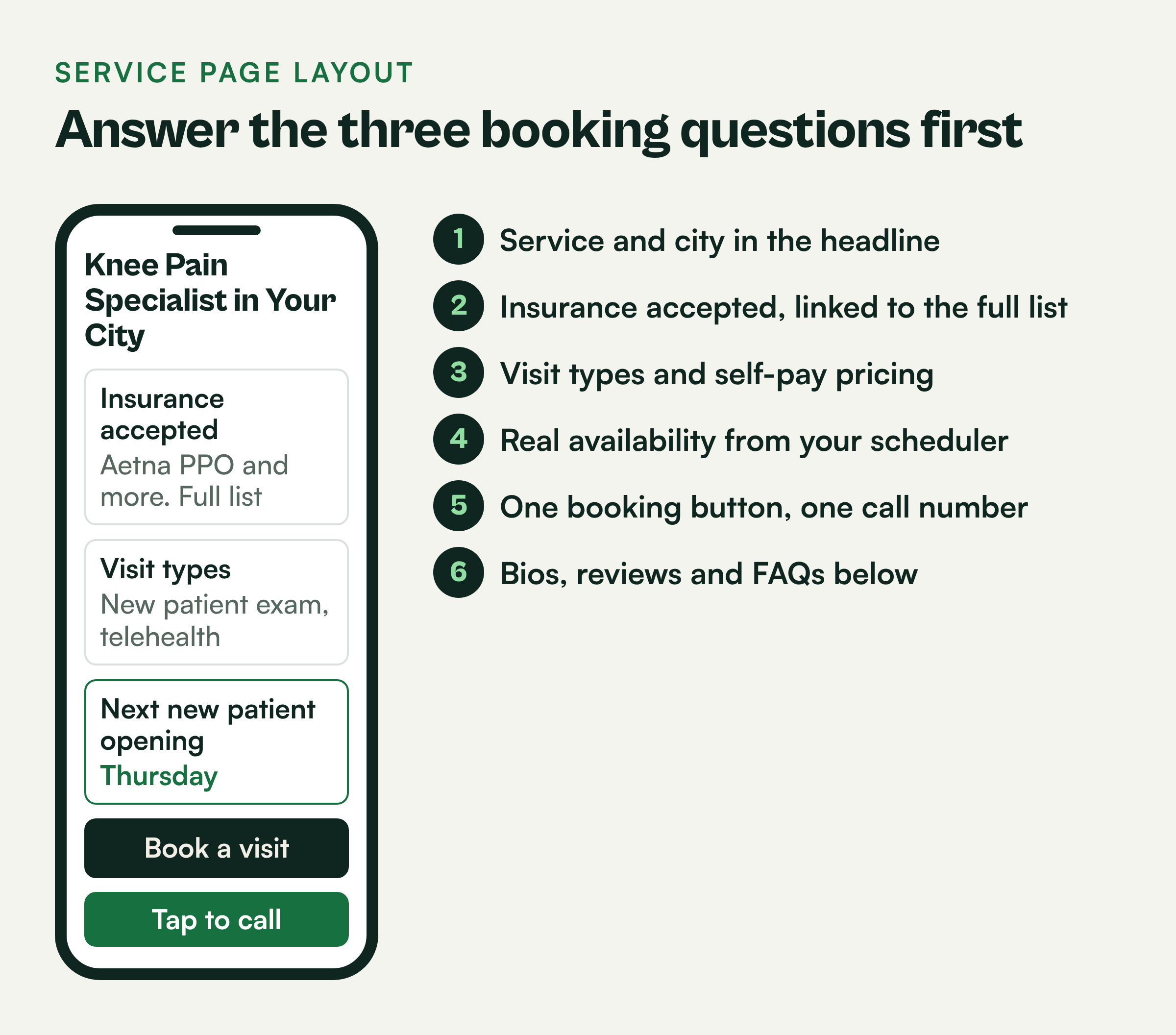
The top of the page has to answer the three questions patients bring with them: do you take my insurance, what kind of visit is this, and when can I get in?
The layout that works:
- A headline naming the service and the city.
- Insurance accepted, with a link to the full list.
- Visit types, such as new patient exam, consult or telehealth, with self-pay pricing if you publish it.
- Real availability pulled from your scheduling system, such as 'next new patient opening: Thursday.'
- One booking button and one click-to-call number.
- Provider bios, reviews and FAQs below that.
Remove risky pixels from booking and condition pages
The ad pixels and tags on your site help Google and Meta optimize your campaigns. On healthcare pages, they also carry risk:
- In December 2022, the HHS Office for Civil Rights issued guidance on tracking technologies on healthcare websites, and class actions over pixels on hospital and practice sites followed.
- A federal court later limited part of that guidance, and the lawsuits have continued.
- Google Ads and Meta do not sign BAAs for their ad tools.
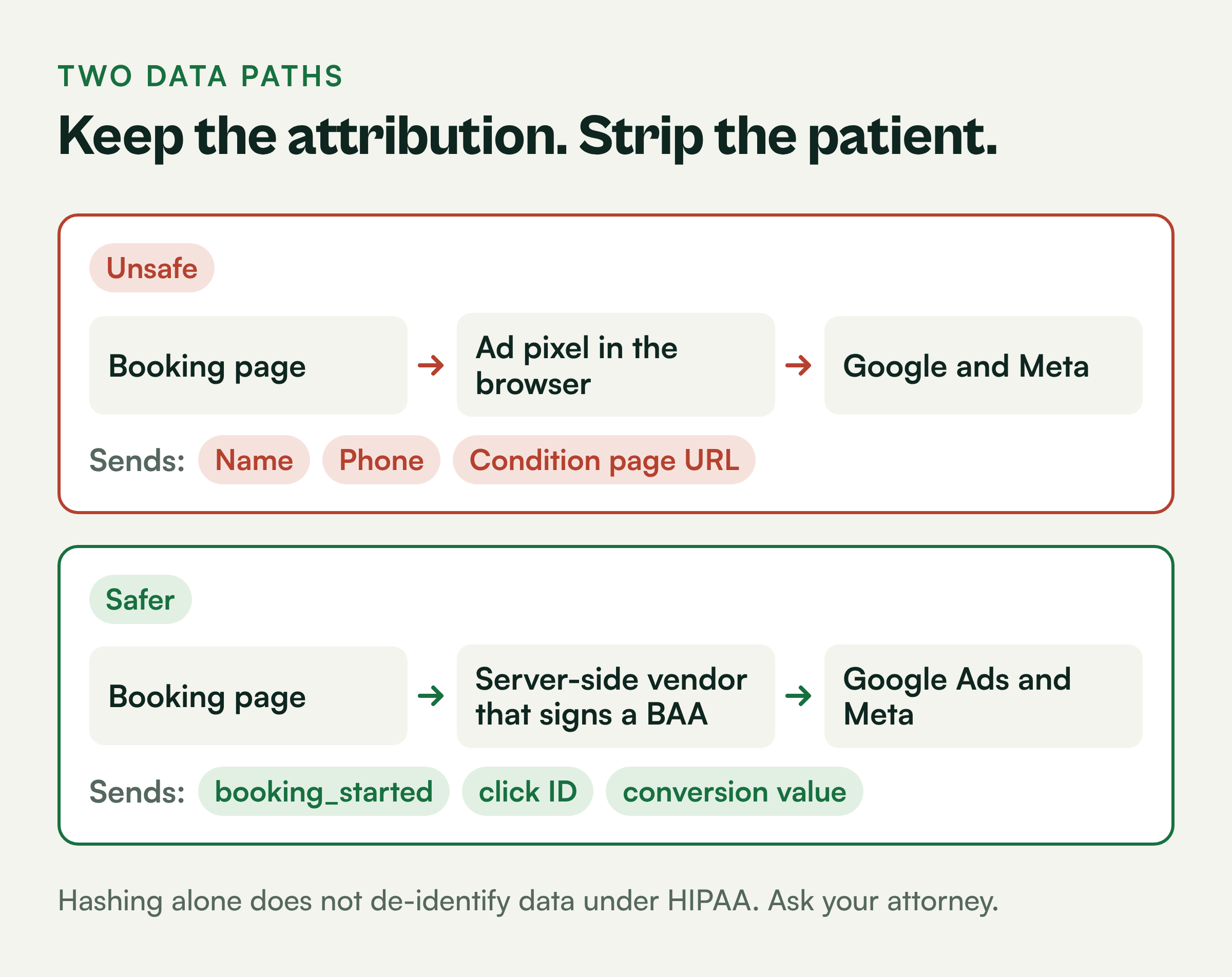
The job is keeping ad tracking running without sending patient data to the ad platforms. That comes in two moves: audit the risky pages, then move to server-side tracking under a BAA.
Talk to your healthcare attorney about your exposure; this section covers the marketing setup.
Audit three page types first:
- Booking pages and scheduling widgets.
- Forms, including contact, new patient and insurance verification.
- Condition and treatment pages, where the URL alone can reveal what someone is looking for.
Then move to server-side tracking through a vendor that will sign a BAA. The browser sends events to that vendor, the vendor strips identifiers and health details, and only events you approve, such as a non-identifying 'booking_started,' go on to Google Ads or Meta.
Assume nothing that reaches Google Ads or Meta should include names, phone numbers, email addresses, conditions or appointment details.
Answer the phones by the hour
Your ads bring in steady new-patient calls, and the monthly answer rate looks fine.
A monthly average hides the lunch hour and the first hour after open. Phones are where most practices lose new patients they already paid for.
To see what missed calls cost you, pull your answer rate by hour of day and day of week. Put a dollar figure on the gap, then cover the hours you miss.
Example math: a location gets 600 new-patient calls a month and answers 80%, so 120 calls go unanswered. If 40% of answered new-patient calls book and 65% of those show, those missed calls cost about 31 kept patients a month.
At the example cost of $103 per kept patient, that is roughly $3,200 a month in ad spend wasted at one location. Multiply that across offices and it often outweighs any campaign problem.
AI overflow coverage can pick up calls when the front desk is full or the office is closed. Set it to answer, capture the reason for the call, and book or hand off; setup is covered in AI agents for patient booking.
Check your Weave or phone vendor contract for four things. You want a signed BAA, clear storage terms for recordings and transcripts, ownership of call data, and the ability to export tracking numbers and call source into your patient CRM.
Connect the practice management system without passing PHI
Your practice management system records who booked and who showed. Your ad platforms only see clicks.
That gap is the break I look for first, as the field notes above describe. Closing it is harder than it sounds:
- Ad platforms need to learn which clicks led to kept patients.
- The bridge between the two has to keep patient identity out.
- Most agencies skip this step, because someone has to own the connection between marketing and operations.
Kept-patient results can go back to Google Ads without passing PHI, as long as you send back only a click ID, a conversion name and a value.
The pattern that works:
- The ad click or call gets a click ID or tracking number, stored by your server-side vendor or call tracking tool.
- The booking is created in your PMS or patient CRM with that ID saved in a source field.
- When the appointment is marked kept, a nightly job sends only the click ID, a conversion name such as 'kept_new_patient' and a value back to Google Ads as an offline conversion.
No names, emails, phone numbers or conditions go in that record. Google's enhanced conversions and Meta's Conversions API ask for hashed customer data, and hashing alone does not make data de-identified under HIPAA, so leave those fields off unless your attorney and vendor approve them.
Which healthcare platforms connect to Google Ads, and how
Google does not sign a BAA for its ad tools, so the question for each platform is how it gets a kept appointment to Google Ads without patient data. Data Manager connects directly to Google Sheets and SFTP, which is how a nightly export from your practice management system can run on a schedule.
| Platform | Direct Google Ads connection? | How it sends conversions | What breaks it |
|---|---|---|---|
| Practice management or EHR system | Varies by vendor. Ask yours. | A source field holds the click ID. A nightly export of kept first appointments with only the click ID, conversion name and value goes to a Google Sheet or SFTP folder that Data Manager reads. | Patients entered by hand at the front desk, with no click ID. Name or phone columns left in the export. Kept status not updated in time. |
| Server-side vendor (Freshpaint is one example) | Yes | Freshpaint signs a BAA. Its Google Ads destination runs in server-side mode for HIPAA customers and passes only the properties on a HIPAA allowlist, such as the click ID and conversion label. | An ad tag still loading in the browser outside the vendor. An allowlist that lets identifiers through. |
| CallRail Healthcare plan | Through Freshpaint | Healthcare plans need a signed BAA. CallRail's Freshpaint integration removes PHI and PII before call data goes on to ad platforms. | Integrations not reauthorized after moving to a Healthcare plan. Calls from location extension numbers carry no click ID. |
We could not find a documented Google Ads conversion connection for Weave or Zocdoc. Track Zocdoc as its own channel with its own cost per kept patient, and take call source from a call tracking number rather than from the phone system.
This is the first thing to build when working with a practice as a fractional CMO for healthcare practices.
Build the dashboard around kept first appointments
Your agency, the ad platforms, Zocdoc and your phone system each send their own report. None of them puts cost per kept new patient side by side by location and channel.
The dashboard you review every week has to do exactly that. Put these numbers side by side, by location and by channel:
- Ad spend.
- New-patient calls and answer rate.
- Booked new-patient appointments.
- Booked-to-kept rate.
- Cost per kept new patient.
Example: Google Search spends $8,000 and produces 90 kept patients, about $89 each. Zocdoc costs $3,000 in fees for 25 kept patients, $120 each. Meta spends $4,000 for 20 kept patients, $200 each.
In that example, new budget goes to search first, and Meta gets fixed or cut. Zocdoc stays as a slot filler for locations with open schedules.
Keep answer rate next to spend. When cost per kept patient rises at one location, check the phones before you touch the ads. For benchmarks, see the healthcare practices report.
Reply to reviews without confirming a patient
A one-star review goes up, and it gets the details of a visit wrong. Someone at the front desk wants to set the record straight in a public reply.
That reply is where practices get into trouble. Confirming the reviewer is a patient, or mentioning their care, discloses patient information in public. In 2019, a dental practice in Dallas paid $10,000 and agreed to a corrective action plan with two years of HHS monitoring after its replies to Yelp reviews disclosed patients' information. The case started with one patient's complaint.
We give the practice one reply for every complaint and put written authorization in front of every patient story:
- Never confirm someone is a patient in a public reply. Use the same words each time: "Thank you for the feedback. Please call our office manager at [number] so we can talk it through."
- Get written authorization before a before-and-after photo or a patient story runs. The signed form names the photos, where they will appear and when the permission expires. That covers every injectable, aligner and veneer case on your site or social accounts.
- Send review requests from a tool that signs a BAA. It uses patient names, phone numbers and visit dates.
Your state dental or medical board can add its own rules on testimonials and before-and-after photos. Check them before the first ad runs.
Protect client data at a cash-pay med spa
Your med spa never bills insurance, and someone has told you that means HIPAA doesn't apply to you.
It may not. HIPAA covers health care providers that send standard electronic transactions, such as insurance claims, directly or through a billing service, and a med spa that never does may fall outside it. Ask your counsel. Falling outside HIPAA still leaves the risk in place. In 2023 the FTC fined GoodRx $1.5 million for sharing users' health data with Facebook and Google. That case ran under the FTC's Health Breach Notification Rule, not HIPAA, and state privacy laws also reach businesses outside HIPAA.
So we treat client health data as protected anyway and set up a cash-pay med spa like any other practice in this guide. Ad pixels stay off booking and intake pages, and only click IDs, conversion names and values go back to Google and Meta.
Sort every tool into keep, cut or connect
The card statements show a dozen software charges, and nobody at the practice can say what half of them do.
Each of those tools is another login, and some of them see patient information without a signed BAA. Example: a practice's statements show 11 marketing tools costing $3,400 a month, or $40,800 a year. None of them is connected to the practice management system, the only place that shows which ad produced a new patient who came in and paid. Three touch patient information with no BAA, including a chat widget where patients describe symptoms.
We do the sort with the office manager, on one sheet, in one sitting:
- List every tool. Name, monthly cost, the job it does, who logs in and whether the vendor has signed a BAA. Work from three months of card statements, so the forgotten subscriptions show up too.
- Put each tool on the patient's path. Found you, visited the site, called or booked, came in, came back. A tool with no step goes.
- Cut the doubles. Two tools on one step means one goes. In the example, the second review tool, the chat widget with no BAA and the reputation dashboard go: $250 + $150 + $500 = $900 a month, or $10,800 a year.
- Connect what's left. Scheduling writes the appointment into your practice management system (Dentrix, Eaglesoft or Open Dental in a dental office, Boulevard or Zenoti in a med spa). Call tracking tags each call with its source. The source stays on the patient record.
- Name one owner. One person approves every new tool, keeps the sheet current and has the BAA on file before anyone logs in.
Fewer tools also means fewer logins where patient data can leak. A "HIPAA compliant" label on a vendor's pricing page is not a BAA, so ask for the signed agreement and keep a copy next to the sheet.
Put these questions to your agency in writing
You have results you want to scale, and your agency is ready to raise spend. You still can't see for yourself what fires on your pages, what data leaves them or how kept patients get counted.
Before you add budget, ask your agency for written answers to these:
- Which tags fire on our booking, form and condition pages today?
- Which vendors in our tracking chain have signed a BAA with us?
- What data, field by field, reaches Google Ads and Meta?
- Do you report cost per kept new patient by location, and where does the kept data come from?
- How are offline conversions sent back, and what is in each record?
- What is our answer rate by hour, and who is responsible for it?
- Who approves changes to pixels, forms and booking widgets?
If the answers are vague, fix the stack before you add budget. You can read more about how I work on the about page, and the healthcare practices book goes deeper on each step.
Questions owners ask
Can a medical practice use Google Ads tracking and stay HIPAA compliant?
Yes, with the right setup. Remove ad pixels from booking, form and condition pages, route events through a server-side vendor that signs a BAA, and send only non-identifying click IDs and conversion names to Google Ads. Confirm your specific setup with a healthcare attorney.
Do Google Ads or Meta sign a BAA?
No, Google Ads and Meta do not sign BAAs for their advertising tools. Treat any data sent to them as data that must not include names, contact details, conditions or appointment details.
What conversion should a practice optimize ads for?
Optimize for a kept first appointment from a new patient. Send it back to Google Ads as an offline conversion from your practice management system using only the click ID, a conversion name and a value.
Is hashed patient data safe to send to ad platforms?
Hashing alone does not make data de-identified under HIPAA. Leave hashed email and phone fields off enhanced conversions and Conversions API unless your attorney and tracking vendor have approved the setup in writing.
What should I check in my Weave or phone system contract?
Look for a signed BAA, storage terms for call recordings and transcripts, who owns the call data, and whether tracking numbers and call source can be exported to your patient CRM for attribution.