
The Law Firm Marketing Operation Map: Every Platform From First Click to Signed Retainer, and Where Attribution Breaks
Key takeaways
- The one number your stack has to report is cost per signed case by channel. Cost per lead alone can push budget toward the campaign that signs the fewest cases.
- Attribution survives only if the click ID is captured on every form and call and stored on the lead record inside your intake CRM.
- Choose Clio Grow, Lawmatics or Litify by one test: can a signed matter, with its case value, show up as a conversion in Google Ads?
- Load the consent banner before any pixel, keep consent logs and disclose call recording at the start of every call to reduce CIPA exposure.
- Referrals, after-hours calls and Google Business Profile edits are the three places attribution still breaks, and each one has a simple patch.
A law firm marketing tech stack should report one number: cost per signed case by channel. To get it, capture the click ID on every form and call, carry it into your intake CRM, send consults booked and retainers signed back to Google Ads through Data Manager, and load consent before any tracking pixel.
Start at the signed case and work backward
Leads come in every day. Google Ads says the campaigns are working, your call tracking tool shows the phones ringing, and the intake CRM is full.
The trouble starts when you try to connect those pieces.
- Each tool reports its own wins, and none of them can tell you which dollar produced which signed retainer.
- Your cheapest leads might be turning into your most expensive cases, and nothing in your reports shows it.
- California Invasion of Privacy Act (CIPA) plaintiffs are reviewing law firm websites for pixels and chat tools that fire before consent.
What you actually need to know is which campaign produced each signed case, and what that case cost you.
I answer that by building one unbroken chain from first click to signed retainer, then judging every channel by one number: cost per signed case. Every platform in your law firm marketing tech stack exists to feed that number.
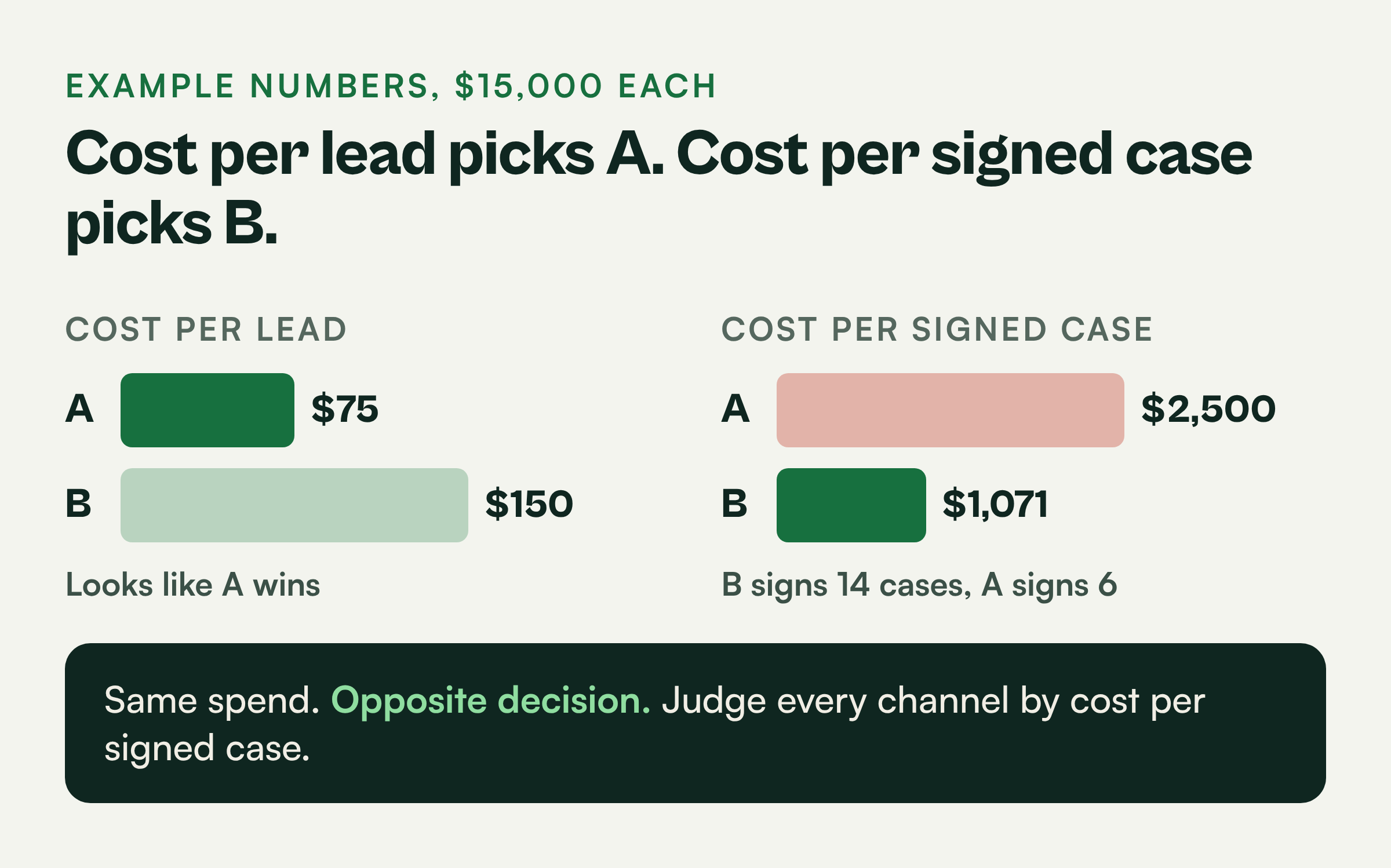
Here is why it matters. These are example numbers for a personal injury firm spending $30,000 a month on Google Ads.
- Campaign A: $15,000 spent, 200 leads, $75 cost per lead, 6 signed cases. Cost per signed case: $2,500.
- Campaign B: $15,000 spent, 100 leads, $150 cost per lead, 14 signed cases. Cost per signed case: about $1,071.
If you manage by cost per lead, you move money into Campaign A. If you manage by cost per signed case, you move it into Campaign B. Same spend, opposite decision.
The fix is one unbroken chain. Capture the Google click ID on every form fill and tracked call. Store it on the lead record in your intake CRM. When a consult is booked or a retainer is signed, send that event back to Google Ads through Data Manager, with the case value attached.
Your first step takes an hour. Pull your last 20 signed cases and try to name the campaign that produced each one. If you can only name a handful, the break is at capture, and that is where the work starts.
The same audit that fixes your attribution should fix your tracking exposure, because it looks at the exact pages CIPA plaintiffs are looking at.
I have spent 15+ years building these systems and managed $500M+ in marketing spend. One law firm I worked with grew from 1 to 7 locations, and the operation map below is the backbone of that kind of growth.
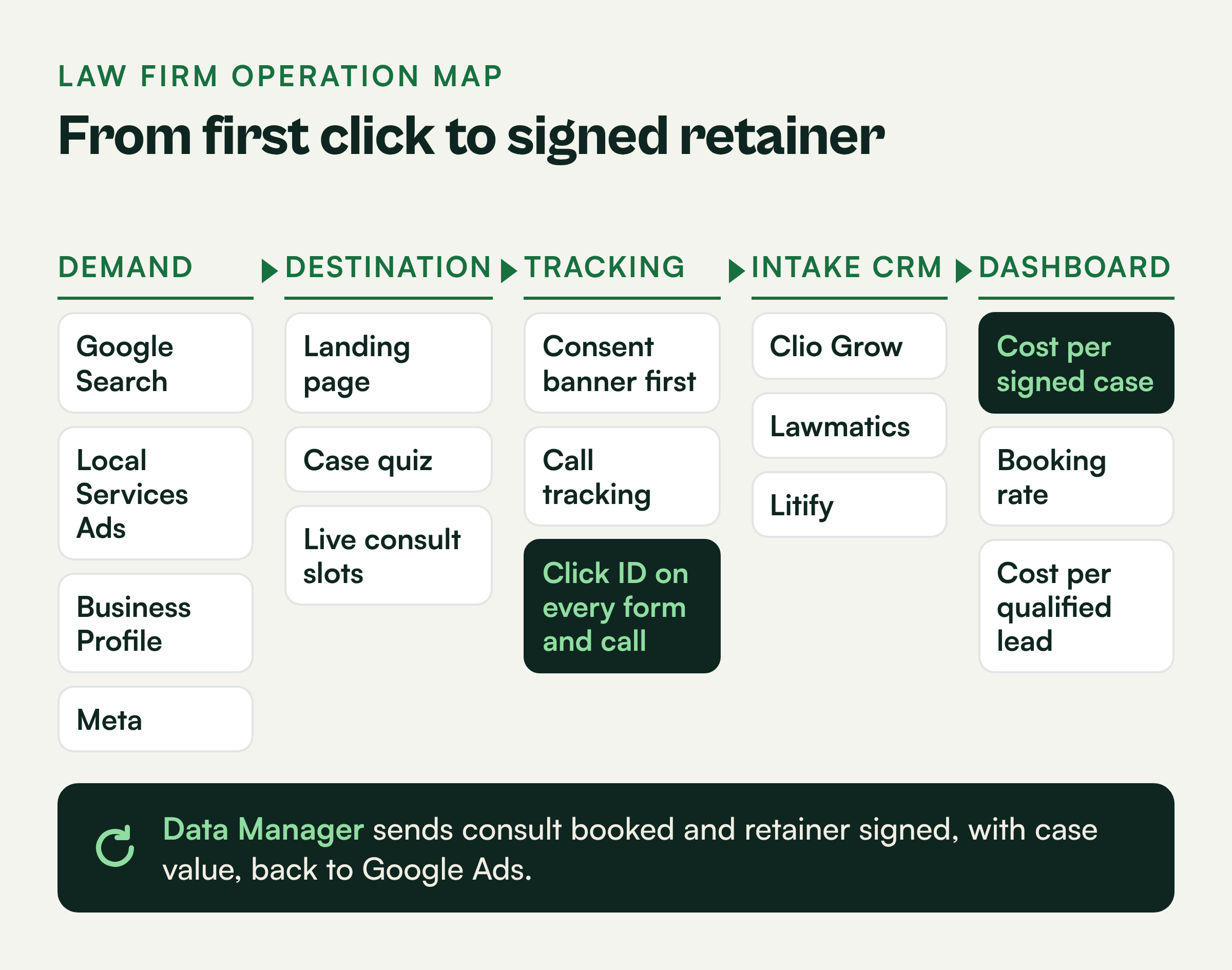
Pick demand channels that can report back to a signed case
Your leads arrive from Google Search, Local Services Ads, your Google Business Profile and maybe Meta, all at once.
Those channels do not report back the same way. Some hand you a click ID and some do not. Calls from free sources go uncounted, so those sources look like they produce nothing.
That leaves two decisions: which channels belong in your mix, and how each one reports back to a signed case. I keep a channel only if its leads can be tied to an outcome in the CRM.
Google Search is still the core channel for most practice areas. People searching for a car accident lawyer or a DUI attorney near them are ready to talk. Search also gives you the click ID you need for clean attribution.
Local Services Ads now sit inside Google Ads. You pay per lead, and the Google Screened badge earns trust at the top of the page.
The tradeoff is that LSA leads arrive through Google's own lead flow, so you have to match them to your CRM by phone number and log the outcome. I covered how missed LSA calls burn budget in this breakdown of LSA missed calls.
Google Business Profile drives map pack calls and direction requests. It costs nothing to run, which is exactly why firms neglect tracking on it. Put a tracking number on the profile so those calls are counted.
Meta fits as a second channel for practice areas where people are not searching yet, such as estate planning, some family law matters and mass tort intake. Use it for retargeting and lead forms.
Treat Meta carefully on consent, because the Meta pixel is one of the tools CIPA plaintiffs look for.
Build landing pages and quizzes that end on a live consult slot
Paid clicks land on your site every day, and some of them fill out a form.
Where they land is usually the problem. Clicks go to the homepage, which has too many exits. Cases you cannot take still end up on the calendar. And the forms do not carry the click ID.
A landing page that turns a click into a booked consult has one job: qualify the person and get them onto the calendar. This is the layout I use most often:
- A headline that matches the search, such as Injured in a Truck Accident in Houston.
- A tracked phone number at the top that is tap-to-call on mobile.
- Three short proof points: years in practice, results you are permitted to share and reviews.
- A case-evaluation quiz of 3 to 5 questions.
- A calendar with live consult slots as the final screen.
The quiz should screen out cases you cannot take. Ask about the date of the incident for statute of limitations, the county or state for jurisdiction and the type of matter.
A disqualified lead should get a polite referral message instead of a consult slot.
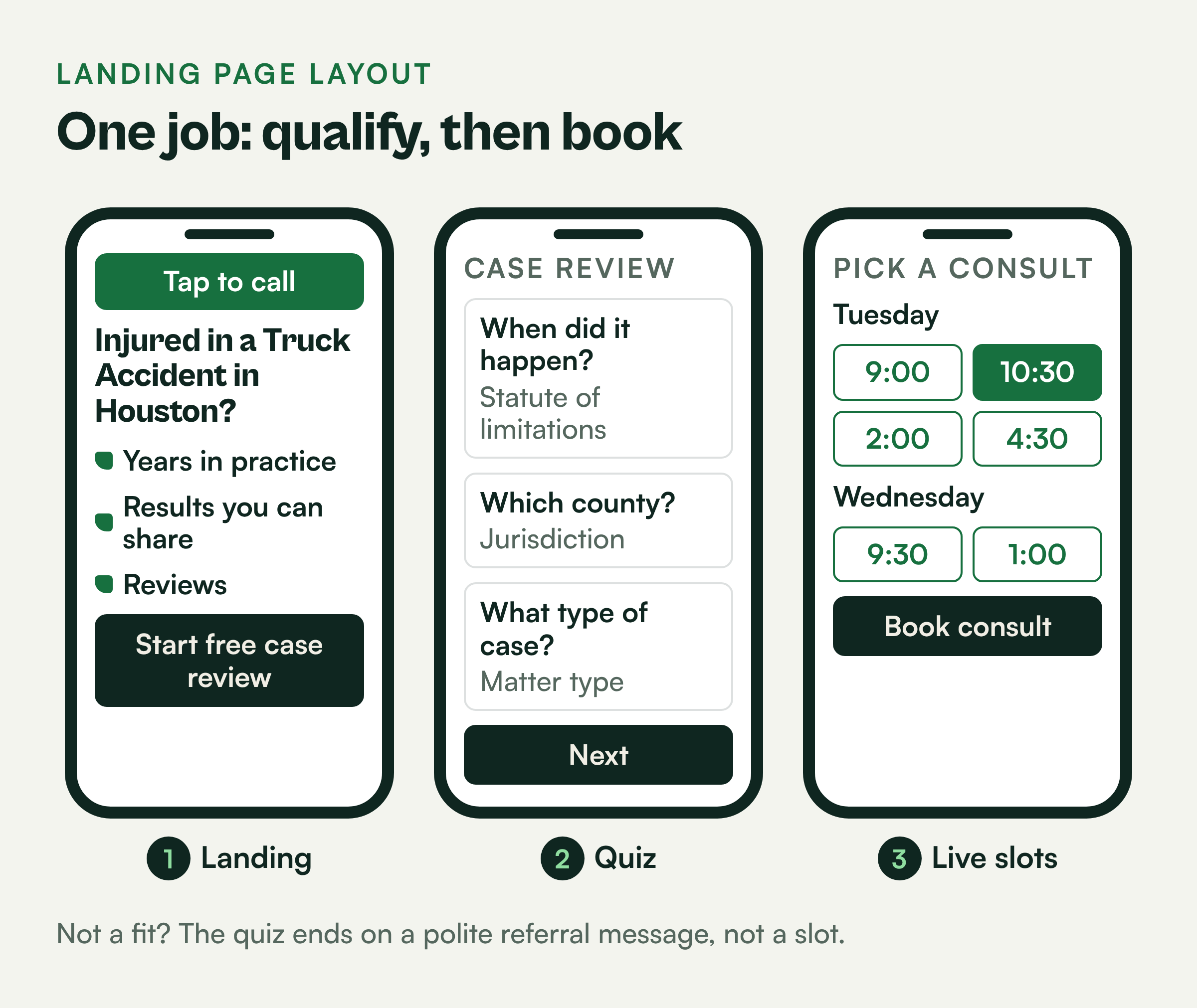
Ending on a live slot changes your numbers. In this example, a firm that books 50% of qualified leads on first contact needs half as many leads to fill the same calendar as a firm that books 25%.
Every form needs hidden fields for the click ID and UTM parameters. Without those fields, the chain breaks on the first page.
Load the consent banner before any pixel fires
To measure every lead, your site runs Google tags, the Meta pixel, a chat widget and call tracking.
Those same tools can expose the firm. CIPA lawsuits have targeted websites that run pixels, session replay and chat tools before a visitor agrees, and law firms are visible targets because their pages collect sensitive details.
You still need the tracking, so the work is keeping it without the exposure. The order fixes most of it: consent first, then tracking. This is practical guidance and does not replace legal advice, so have your counsel review your setup.
The working rules:
- Load a consent management platform first, before Google tags, the Meta pixel or any chat widget.
- Block advertising tags until the visitor accepts, and use Google Consent Mode so Google receives the consent state.
- Keep consent logs that record what each visitor agreed to and when.
- Remove session replay tools from intake and quiz pages.
Call tracking needs its own care. California requires all parties to consent before a call is recorded. Play a recording disclosure at the start of every tracked call, or turn recording off for calls you cannot disclose.
You can still capture the click ID and call source without recording a word. Attribution comes from the tracking number and the click data. The recording is optional.
Choose an intake CRM that can send signed-case data back to Google Ads
You have seen demos from Clio Grow, Lawmatics and Litify, and all three handle intake.
None of the demos made clear which one will actually send a signed matter back to Google Ads with its value attached. That is the part that closes the loop, so that is the part I test.
Every vendor goes through the same four tests:
- Can it store the click ID and UTM values in fields on the lead or matter?
- Can it trigger an event when the stage changes to consult booked or retainer signed?
- Can it send that event to Google Ads natively, through an automation tool like Zapier, or through a connected platform?
- Can it include a case value with the event?
Litify runs on Salesforce, so it can use the Salesforce routes to Google Ads if your admin sets them up. Clio Grow and Lawmatics fit smaller and mid-size firms, and their connection paths vary by plan and setup.
Do not take the answer from a sales sheet. Ask the vendor to show you, live in a demo, a test matter marked signed and then appearing as a conversion in Google Ads.
If you are tightening intake at the same time, read my notes on law firm intake.
Send consults, retainers and case value back through Data Manager
Your CRM already records which leads booked consults and which signed retainers.
Google Ads never hears about any of it. It only sees the click, so it bids as if every lead is worth the same.
You teach it which clicks became cases with offline conversion imports. Google's Data Manager is the place in Google Ads where you connect your CRM data and manage these imports, and it is where the fix for the criminal defense firm in the field notes above came together.
Set up three conversion actions:
- Qualified lead, counted when intake marks the lead as a fit.
- Consult booked, counted when the consult is on the calendar.
- Retainer signed, counted with a case value.
For case value, use an expected fee by case type. Example: if your average personal injury fee is $12,000 and your average property damage fee is $2,000, send those values with each signed retainer. Google can then bid toward the cases worth more.
Turn on enhanced conversions for leads. It uses hashed email and phone data to match conversions when the click ID is missing, which recovers some leads that would otherwise go dark.
Upload daily. Use consult booked as the primary bidding goal until you sign enough cases each month for Google to learn from, then shift toward retainer signed.
Which law firm platforms connect to Google Ads directly
Some platforms in a law firm stack have a direct connection to Google Ads and some need a bridge. Salesforce connects directly: Google Ads Data Manager imports conversions from Salesforce Lead, Opportunity and Order records, matched on the click ID stored on the record. It replaced Google's legacy Salesforce integration, which stopped being supported on May 31, 2025. CallRail's Google Ads integration posts calls and forms on its own. Lawmatics, Clio Grow and Litify each need a setup step or a bridge.
| Platform | Direct Google Ads connection? | How it sends conversions | What breaks it |
|---|---|---|---|
| Salesforce | Yes, through Data Manager | Imports the lead statuses and opportunity stages you choose, such as consult booked and retainer signed, matched on a GCLID field on the lead and the opportunity. | No GCLID field, or the field is not mapped from lead to opportunity when the lead converts. Stage names renamed after setup. Signed cases more than 90 days after the click. |
| Litify | Through Salesforce | Litify runs on Salesforce, so it can use the same Data Manager connection when the click ID and the signed stage sit on a Lead, Opportunity or Order record. | The signed stage only exists on a Litify intake or matter record that the connection does not read. |
| Lawmatics | No native conversion sync | Lawmatics' help center sends offline conversions through a Zapier zap: a Lawmatics trigger, the Google Ads offline conversion action and the matter's GCLID. Its built-in Google Ads integration logs ad spend against your sources. | Matters with no GCLID. A zap that fires when a matter is created instead of when it is signed. Zap errors nobody reviews. |
| Clio Grow | No native connection we could verify | Zapier's Clio app supports Clio Manage, not Clio Grow, per Zapier's help center. Send the event when the matter opens in Clio Manage, or upload a file in Data Manager. | The click ID is not carried from the Grow lead into the Manage matter. Leads entered by hand from phone calls. |
| CallRail | Yes, its own integration | Posts calls and forms as conversions using Google click IDs (GCLID, GBRAID, WBRAID). Needs CallRail's script, visitor tracking and auto-tagging. Older calls can go up by CSV if the click was within 90 days. | It does not backfill calls from before it was turned on. Renaming the conversion action in Google Ads stops posting. Calls from location extension numbers carry no click ID. |
A multi-location criminal defense firm we work with could not get offline conversion data back into Google Ads. Only 23% of its signed cases carried a click ID, and a separate upload that matched signed cases by email address re-sent the same 78 cases every day without matching a single one. Once forms and calls captured the click ID and Salesforce sent the signed-case stage back through the Google Ads integration, new leads with a click ID went from between 22% and 30% to 78% within weeks.
Email matching can work, but Google's enhanced conversions for leads diagnostics expect the email to be normalized and hashed the same way your forms captured it. A click ID stored on the record is the more reliable key, so fix capture first.
Build the attribution dashboard around three numbers
You have three separate reports: one from Google Ads, one from your call tracking tool and one from your intake CRM.
They never line up with each other. When a channel looks weak, you cannot tell whether the channel is the problem or intake is.
Your dashboard should tell you where the next dollar goes, and it only needs three numbers by channel to do it. I pull all three sources into one view. Looker Studio or a similar tool works, and I build these inside my Marketing Impact OS.
| Channel (example) | Spend | Qualified leads | Cost per qualified lead | First-contact booking rate | Signed cases | Cost per signed case |
|---|---|---|---|---|---|---|
| Google Search | $18,000 | 120 | $150 | 45% | 15 | $1,200 |
| LSA | $7,000 | 70 | $100 | 30% | 5 | $1,400 |
| Meta | $5,000 | 40 | $125 | 20% | 2 | $2,500 |
Cost per qualified lead tells you whether the channel brings the right people. First-contact booking rate tells you whether intake is converting them. Cost per signed case tells you where the next dollar goes.
In this example, LSA has the cheapest qualified lead but a weak booking rate. That points to an intake problem, such as slow callbacks, before it points to a channel problem.
Patch the gaps where attribution still breaks
Once the chain is in place, most of your cases trace cleanly from click to signed retainer.
A few still leak. Referral cases show up under the wrong source. After-hours calls never reach the CRM. Your Google Business Profile phone number changes without your approval.
Even a clean stack has these three leaks, and each one has its own fix.
Referrals. A former client sends a friend who later searches your firm name and clicks an ad. Add a required intake question about how they heard about you, with a fixed picklist, and compare it to the tracked source. Report referral cases as their own channel.
After-hours calls. Answering services often take messages outside your CRM. Require the service to log every call in the CRM with the tracking number that was dialed, and review missed calls each morning.
Google Business Profile edits. The public can suggest edits to your phone number and hours, and Google sometimes accepts them. Set your tracking number as the primary phone, keep your main line as an additional number and check the profile weekly.
Get your operation map built
Some of this map is probably already in place at your firm.
The real test is whether you can trace a signed case back to its campaign today. If you cannot, start with the 20-case test above. When you want a second set of eyes, my free marketing assessment reviews your channels, tracking and intake against this map.
You can read more about me or see how I work as a fractional CMO for law firms. For benchmarks by practice area, see the law firm marketing report.
Questions owners ask
What should a law firm marketing tech stack include?
Demand channels such as Google Search, LSA and Google Business Profile, landing pages with a case-evaluation quiz, a consent management platform, call tracking, an intake CRM like Clio Grow, Lawmatics or Litify, offline conversion imports into Google Ads and an attribution dashboard.
How do I connect signed cases back to Google Ads?
Capture the click ID on every form and tracked call, store it in your intake CRM, then send consult booked and retainer signed events to Google Ads through Data Manager. Add enhanced conversions for leads to match records when the click ID is missing.
Which intake CRM is best for attribution?
The best one for your firm is the one that can store the click ID, trigger on stage changes and send a signed matter with its case value to Google Ads. Ask each vendor to show this working live in a demo before you sign.
How does CIPA affect law firm websites?
CIPA lawsuits have targeted sites that run pixels, session replay or chat tools before visitors consent. Load a consent banner before any tag, keep consent logs, disclose call recording at the start of calls and have your counsel review your setup.
What is a good cost per signed case?
It depends on your practice area and average fee. Compare cost per signed case to your expected fee per case type, and compare channels against each other rather than against a general benchmark.